
How to Use FreeRouter with Hermes Agent
Hermes Agent is an open-source agent built by Nous Research: a self-improving loop with learned skills, persistent memory, forty-odd built-in tools, MCP support, and messaging on Telegram, Discord, Slack, and more. It lives where you put it — a laptop, a VPS, a chat channel — and it works with any OpenAI-compatible endpoint. The usual setup is to point it at the vendor you already pay for and get on with things. That's a reasonable setup.
What it commits you to is one provider configuration per backend. Each backend has its own key, its own model ids, and its own place where spend shows up. Moving the agent to a different backend means reconfiguring the agent, and trying a model that lives on another gateway means a second configuration to maintain.
The constraint you hit first is staleness. Gateways keep appearing and repricing, and the agent is pinned to whichever backend was cheapest or fastest on the day you configured it. When your backend rate-limits the account or has a slow hour, the agent waits on it everywhere you talk to it — the terminal, Telegram, Slack, all of it.
FreeRouter fits into the custom endpoint path. The hermes model flow takes any OpenAI-compatible base URL and key, plus an explicit compatibility mode. Point it at a FreeRouter key — base URL https://api.freerouter.com/v1, mode 2 (Chat Completions) — and the key's routing rule decides which of your gateways serves each request, moving to the next one when the first fails. It's the usual two changes, base URL and key, and a gateway you add later is a dashboard row that Hermes never sees.
Below: how the pieces connect, why it's worth doing even with one gateway behind it, the four-step setup with the wizard as reference, and the edges you should know about before relying on it.
What it looks like when Hermes talks to FreeRouter
Hermes sees one custom provider with one default model. Each agent turn goes to an fr_live_ key that carries the API shape, the routing rule, and any model remaps. Behind the key sit your gateway accounts, each with your own provider key. OpenRouter can be the first one, and a second gateway is a row you add when you want failover. The Hermes configuration stays the same through all of it.
flowchart LR
    Hermes["Hermes: custom provider, chat_completions"] -->|"POST /v1/chat/completions"| Key["fr_live_ key: openai shape, rule, remaps"]
    Key --> OR["OpenRouter (your key)"]
    Key -.->|"a row you add later"| GW2["Second gateway (your key)"]
    OR --> M["default model"]
    GW2 --> M2["same default model"]
Hermes talks to one endpoint. The dotted path is a dashboard edit the agent config never sees.
Why put a router between Hermes and the vendor
Hermes already speaks OpenAI-compatible endpoints natively, so the fair question is what the extra hop buys an agent that runs for weeks. Two things: new gateways slot in without touching the agent, and the agent survives one gateway having a bad hour.
1. New backends arrive as dashboard rows
Gateways price the same model differently and new ones keep appearing. With a vendor configured directly in Hermes, each one is a reconfiguration of the agent. Through FreeRouter, each one is a provider key plus a row in the routing rule — a priority rule for failover, or a weighted split when you want traffic shared. Hermes keeps sending the same requests to the same base URL, and the default model id keeps working because each target receives its own spelling of it (see model IDs across gateways). Switching what serves the agent — from the terminal or from any chat channel it bridges to — never requires touching the agent's config, because there is nothing in it left to change.
2. The agent keeps working when one gateway doesn't
A priority rule tries its targets in order and moves to the next one on connection errors, 5xx, 429, a model the target doesn't list, or no response headers inside the failover timeout (5 seconds by default, adjustable per key and per target). The move happens inside the same request, so the agent loop gets an ordinary completion and carries on. A 400 that would fail everywhere comes straight back, since retrying a malformed body around the list helps nobody.
When a failover happens, X-FreeRouter-Failover lists each skipped attempt as gateway:reason, X-FreeRouter-Provider names the gateway that answered, and the same attempt path is on the request's row in Logs.
Setting it up
Plan on fifteen minutes, most of it in the dashboard. You need an API key for at least one gateway (your OpenRouter key is fine) and Hermes installed (see the installation guide).
- Create a FreeRouter key on one provider. Sign up with Google or email plus an OTP, add your gateway key under Providers (BYOK — you keep the account and the bill), then mint an
fr_live_key with the defaultopenaishape and point its routing rule at that one provider, 100%. That's a legitimate rule to start with; failover arrives when you add a second target. Leave MCP tools and Companion Ads off on this key (more on that under limits). - Point Hermes at the key as a custom endpoint. Run
hermes modeland choose the custom endpoint path. Set the API base URL tohttps://api.freerouter.com/v1and paste yourfr_live_key. If Hermes warns that it could not verify the endpoint via/v1/models, carry on — it still saves the endpoint. (FreeRouter's/v1/modelsanswers the merged catalog for the key when called with it, so Hermes lists models from the key rather than from a hardcoded vendor list.) - Pick Chat Completions mode. Choose option 2, Chat Completions, which matches the key's
openaishape. Auto-detect usually lands here too, but picking it explicitly skips the probing. - Set the default model and send a prompt. Type a model id your key serves — copy one from the Playground's model picker, which lists the same merged catalog. Then talk to the agent and open Logs:
X-FreeRouter-Providershould name your gateway and the Router vs Upstream split should look sane. The dashboard Playground and Test button won't tell you this, because they call providers from the dashboard rather than throughapi.freerouter.comand are never logged.
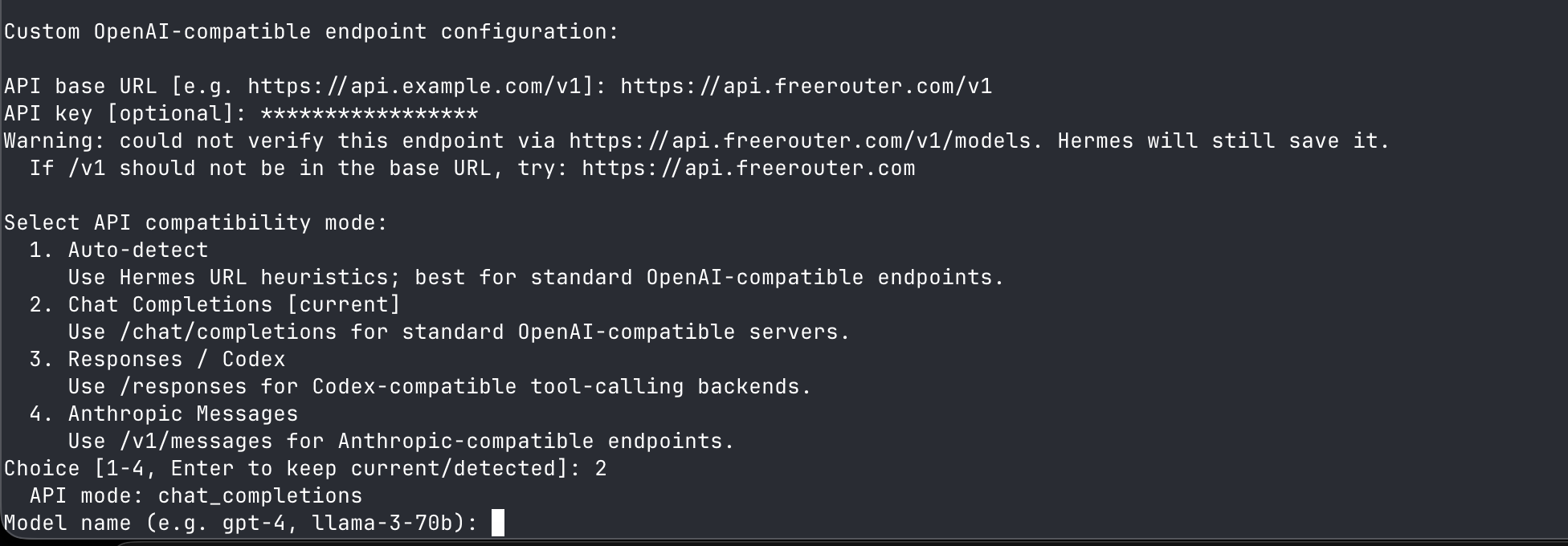
Checking what Hermes sends
Before trusting the agent, send the kind of request it sends and read the headers back:
export FREEROUTER_API_KEY=fr_live_…
curl -i https://api.freerouter.com/v1/chat/completions \
  -H "Authorization: Bearer $FREEROUTER_API_KEY" \
  -H "Content-Type: application/json" \
  -d '{
    "model": "z-ai/glm-5.3",
    "messages": [{ "role": "user", "content": "Reply with the word ready." }]
  }'
You should get an ordinary completion. The -i is there for the headers: X-FreeRouter-Provider (who served it), X-FreeRouter-Attempts (how many targets were tried, 1 for now), and X-FreeRouter-Request-Id (quote this if you ever ask us about a request). If this works, the agent config works — Hermes is sending the same shape to the same key.
flowchart TD
    A["Sign up, key on one provider, rule 100 percent"] --> B["hermes model, custom endpoint"]
    B --> C["Base URL, fr_live_ key, Chat Completions"]
    C --> D["Default model, prompt, then check Logs"]
Four steps, one endpoint on the Hermes side. Everything that changes later happens inside step one.
What the setup buys later
The first change most people make is a second gateway. Add its key under Providers and put it under the first in a priority rule, and failover starts working for every agent turn on the key, with ids translated to the second gateway's spelling. Nothing in Hermes changes. If a model gets cheaper or faster on that second gateway, add a remap from the id Hermes already sends at percent: 20, watch the split in Logs, and take it to 100 or delete it.
If the case for a router in front of a single gateway still feels thin, the one-gateway post makes it at length.
Limits and failure modes
- One target means no failover. With a single gateway behind the key there's nothing to fall over to, and the agent sees that gateway's outages directly. Add a second target before you need it.
- FreeRouter doesn't pick your model. If the default model id is wrong for the task, routing delivers the wrong answer more reliably. Choosing models stays with you.
- This guide uses Chat Completions mode. Hermes lists other compatibility modes, including Responses / Codex and Anthropic Messages. This setup is written and tested against Chat Completions; the others are untested here.
- The hop costs something. Overhead is sub-1 ms on a simple route and 20–30 ms with remaps, translation, or failover drain. Next to a long agent turn that's small, but you don't have to take our word for it: every Logs row shows the Router vs Upstream split.
- Billing stays with your providers. FreeRouter is BYOK: inference is charged to your gateway accounts, and routing itself is free during the preview. It doesn't make tokens cheaper.
- Keep MCP tools and Companion Ads off on this key. Hermes runs its own tool loop with its own MCP support, so a server-side tool loop inside the same request would make transcripts hard to reason about. Companion Ads and Keyterms are built for apps with end users and have no job to do in an agent session.
Next steps
Create a key, point Hermes at it as a custom endpoint, and run one task with the Logs tab open. Once the provider column looks right, add a second gateway to the rule, since that's the point where the router starts paying for itself.