
How to Use FreeRouter with TablePlus
TablePlus is a database GUI for working with your data directly: browse tables, edit rows, run SQL. Its LLM Agent (Settings → LLM Agent) adds an Assistant tab to the right sidebar that writes queries for you. Pick a vendor — OpenAI, Anthropic, Google AI, OpenRouter, DeepSeek, GitHub Copilot, Codex CLI, Ollama, or a local model — paste a key, and ask in plain language. The plugin ships enabled and works as a chat client against whichever vendor you configure. For anyone living in their database all day, that's a reasonable setup.
What it commits you to is one vendor entry per provider, each with its own key and its own model list. The assistant's default model belongs to that vendor's catalog, and moving the assistant to a different backend means reconfiguring the entry. None of that is a problem by itself. It just means the assistant is only ever pointed at one place.
The constraint you hit first is availability. The assistant is only as available as the single vendor behind it: when that vendor rate-limits your account or has a slow hour, the tab errors and you wait or you reconfigure. And when a model you want to try lives on a different gateway, testing it means a second entry, a second key, and remembering which is which.
FreeRouter fits into the custom vendor row. A TablePlus vendor entry is a name, a key, a host, and a sub path — an OpenAI-compatible endpoint. Point those at a FreeRouter key (https://api.freerouter.com plus /v1), and the key's routing rule decides which of your gateways serves each request, moving to the next one when the first fails. It's the usual two changes, base URL and key, and a gateway you add later is a dashboard row that TablePlus never sees.
Below: how the pieces connect, why it's worth doing even with one gateway behind it, the setup with both reference screenshots, and the edges you should know about before relying on it.
What it looks like when TablePlus talks to FreeRouter
TablePlus sees one vendor, FreeRouter, with one default model. Each assistant request goes to an fr_live_ key that carries the API shape, the routing rule, and any model remaps. Behind the key sit your gateway accounts, each with your own provider key. OpenRouter can be the first one, and a second gateway is a row you add when you want failover. The TablePlus entry stays the same through all of it.
flowchart LR
    TablePlus["TablePlus: vendor FreeRouter"] -->|"POST /v1/chat/completions"| Key["fr_live_ key: openai shape, rule, remaps"]
    Key --> OR["OpenRouter (your key)"]
    Key -.->|"a row you add later"| GW2["Second gateway (your key)"]
    OR --> M["default model"]
    GW2 --> M2["same default model"]
TablePlus talks to one vendor. The dotted path is a dashboard edit the vendor entry never sees.
Why put a router between TablePlus and the vendor
TablePlus already speaks OpenRouter natively, so the fair question is what an extra hop buys a query-writing side panel. Three things: the assistant survives one gateway having a bad hour, the default model stops depending on which gateway serves it, and there is one place to look afterward.
1. The assistant keeps working when one gateway doesn't
A priority rule tries its targets in order and moves to the next one on connection errors, 5xx, 429, a model the target doesn't list, or no response headers inside the failover timeout (5 seconds by default, adjustable per key and per target). The move happens inside the same request, so the Assistant tab gets an ordinary answer and you never open Settings. A 400 that would fail everywhere comes straight back, since retrying a malformed body around the list helps nobody.
When a failover happens, X-FreeRouter-Failover lists each skipped attempt as gateway:reason, X-FreeRouter-Provider names the gateway that answered, and the same attempt path is on the request's row in Logs.
2. The default model stops depending on the gateway
Gateways spell the same model differently. OpenRouter lists z-ai/glm-5.3, Fireworks writes accounts/fireworks/models/glm-5p3, and Sail wants zai-org/GLM-5.3 with that exact casing. Configured directly in TablePlus, those would be three vendor entries for one model. Through FreeRouter you send the canonical id and each target receives its own spelling (see model IDs across gateways), so the Default Model field survives a change of gateway and failover can land on a second gateway for the same model.
When a model that writes good SQL ships on only one of your gateways, a model remap points the id TablePlus already sends at that destination. Each remap carries a percent (1–100), rolled per request, so percent: 20 sends a fifth of the assistant's traffic to the new destination while the rest follows the rule. Compare the two in Logs, then take it to 100 or delete it. TablePlus never learns the new name.
3. One vendor entry on each machine, provider keys in the workspace
When TablePlus talks to vendors directly, the raw provider keys sit in TablePlus settings on every machine that runs it. With FreeRouter, each machine holds a single fr_live_ key, and the provider keys stay in the workspace, encrypted at rest (BYOK). Rotating a provider key becomes one dashboard edit, and nobody has to touch TablePlus.
The same key gives you one place to look afterward. Every assistant request logs which gateway served it, the attempt path, and a Router, Upstream, and Duration split, across all of your gateways at once.
Setting it up
Plan on fifteen minutes, most of it in the dashboard. You need an API key for at least one gateway (your OpenRouter key is fine) and TablePlus installed.
- Sign up. Create an account with Google or email plus an OTP. You land in a workspace.
- Add your gateway key as a provider. Providers → add the gateway you already use and paste its key. Your existing vendor entry in TablePlus keeps working, so you can run both paths side by side while you compare.
- Create a FreeRouter key with the
openaishape. API Keys → new key. The defaultopenaishape serves/v1/chat/completions, which is what a Host plus a/v1sub path calls. Leave MCP tools and Companion Ads off on this key (more on that under limits). - Point the routing rule at that one provider. One target, 100%. That's a legitimate rule to start with; failover arrives when you add a second target.
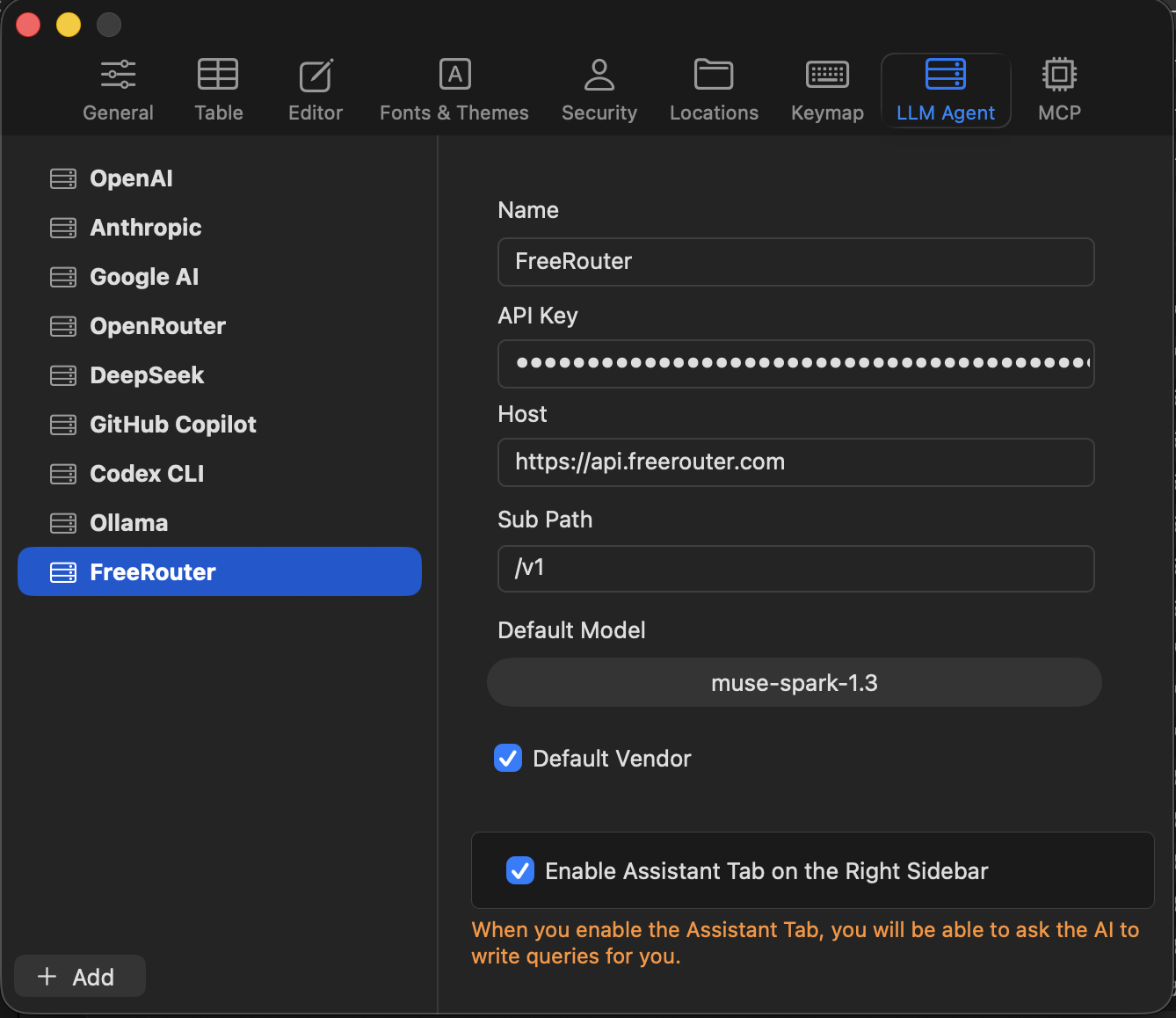
- Add the vendor in TablePlus. Open Settings → LLM Agent and click + Add at the bottom of the vendor list. Fill in Name
FreeRouter, paste yourfr_live_key as the API Key, set Host tohttps://api.freerouter.comand Sub Path to/v1, and put a model id your key serves in Default Model — copy one from the Playground's model picker, which lists the same merged catalog. Tick both Default Vendor and Enable Assistant Tab on the Right Sidebar:
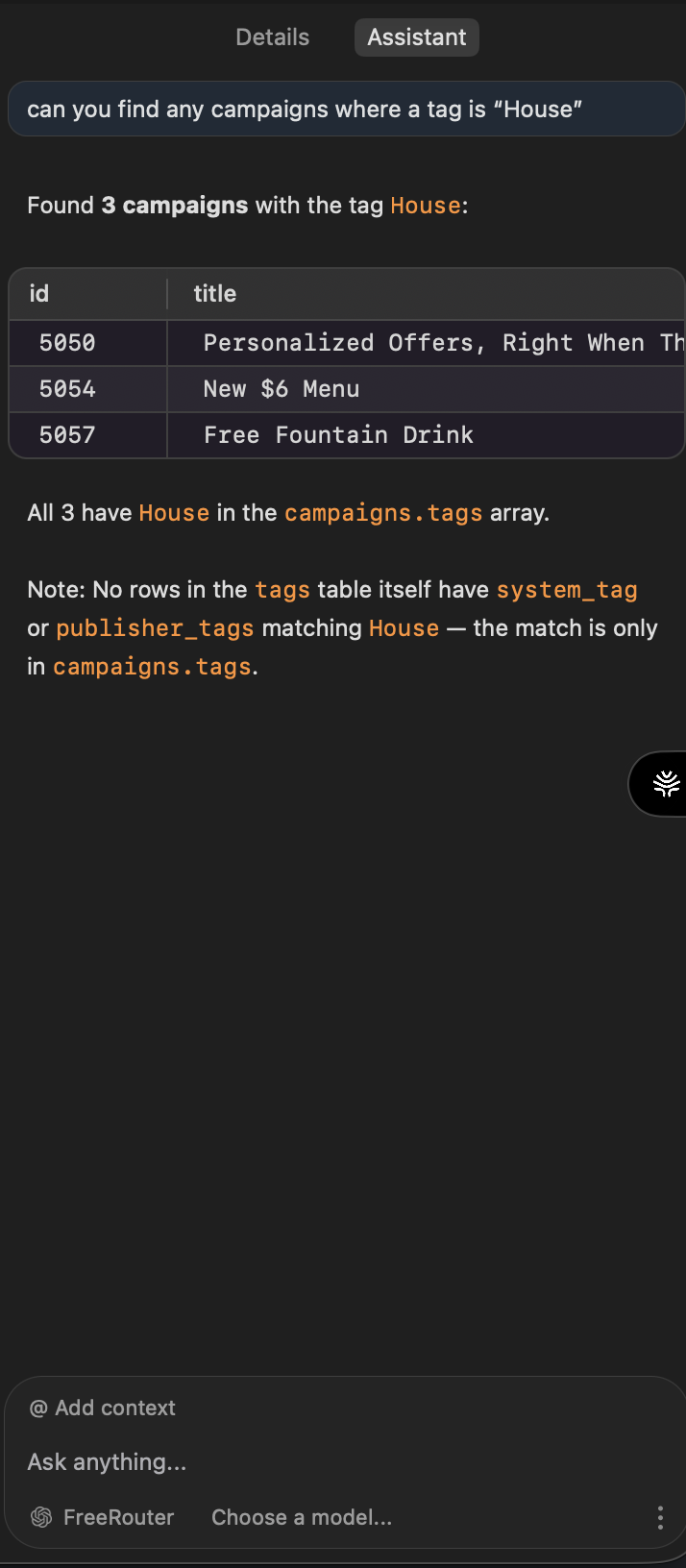
- Open the Assistant and ask it something. The tab docks on the right sidebar — the vendor picker sits at the bottom, the prompt box above it. Ask for a query against a table you have open, then open Logs and check that
X-FreeRouter-Providernames your gateway and that the Router vs Upstream split looks sane. The dashboard Playground and Test button won't tell you this, because they call providers from the dashboard rather than throughapi.freerouter.comand are never logged:
Checking what TablePlus sends
Before trusting the tab, send the kind of request it sends and read the headers back:
export FREEROUTER_API_KEY=fr_live_…
curl -i https://api.freerouter.com/v1/chat/completions \
  -H "Authorization: Bearer $FREEROUTER_API_KEY" \
  -H "Content-Type: application/json" \
  -d '{
    "model": "z-ai/glm-5.3",
    "messages": [{ "role": "user", "content": "Reply with the word ready." }]
  }'
You should get an ordinary completion. The -i is there for the headers: X-FreeRouter-Provider (who served it), X-FreeRouter-Attempts (how many targets were tried, 1 for now), and X-FreeRouter-Request-Id (quote this if you ever ask us about a request). If this works, the vendor entry works — TablePlus is sending the same shape to the same key.
flowchart TD
    A["Sign up, land in workspace"] --> B["Providers: add gateway key"]
    B --> C["API Keys: new fr_live_ key, openai shape"]
    C --> D["Rule: 100 percent to gateway"]
    D --> E["TablePlus Settings, LLM Agent, Add vendor"]
    E --> F["Host api.freerouter.com, Sub Path /v1, key, model"]
    F --> G["Assistant tab, ask, then check Logs"]
Seven steps, one vendor entry on the TablePlus side. Everything that changes later happens between C and D.
What the setup buys later
The first change most people make is a second gateway. Add its key under Providers and put it under the first in a priority rule, and failover starts working for every assistant request on the key, with ids translated to the second gateway's spelling. Nothing in TablePlus changes. If a model that writes better SQL appears on that second gateway, add a remap from the id TablePlus already sends at percent: 20, watch the split in Logs, and take it to 100 or delete it.
If the case for a router in front of a single gateway still feels thin, the one-gateway post makes it at length.
Limits and failure modes
- One target means no failover. With a single gateway behind the key there's nothing to fall over to, and the Assistant tab sees that gateway's outages directly. Add a second target before you need it.
- FreeRouter doesn't pick your model. If the Default Model id is wrong for the task, routing delivers the wrong answer more reliably. Choosing models stays with you.
- TablePlus sends schema, not rows. The plugin shares the table and view structure with the vendor and never sends data records; FreeRouter only ever sees what TablePlus sends. Logs store routing metadata, never response bodies — request bodies only with capture switched on — so query results aren't sitting in the dashboard.
- The hop costs something. Overhead is sub-1 ms on a simple route and 20–30 ms with remaps, translation, or failover drain. Next to a model's generation time that's small, but you don't have to take our word for it: every Logs row shows the Router vs Upstream split.
- Billing stays with your providers. FreeRouter is BYOK: inference is charged to your gateway accounts, and routing itself is free during the preview. It doesn't make tokens cheaper.
- Keep MCP tools and Companion Ads off on this key. TablePlus runs its own prompt loop against the vendor, so a server-side tool loop inside the same request would make transcripts hard to reason about. Companion Ads and Keyterms are built for apps with end users and have no job to do in a side panel.
Next steps
Create a key, add the FreeRouter vendor in TablePlus, and ask the Assistant for one query with the Logs tab open. Once the provider column looks right, add a second gateway to the rule, since that's the point where the router starts paying for itself.